
A dashboard in Home Assistant provides the user interface to monitor and control your Home Assistant instance. They are extremely flexible, and there is quite a community around creating the fanciest dashboards you’ve ever seen. But with this great power comes great responsibility. It is easy to make mistakes in your dashboards, and it is not always easy to find them.
Spook enhances the dashboard integration of Home Assistant by raising repairs issues in case it detects something is wrong with a dashboard.
Devices & entities
Spook does not provide any new devices or entities for this integration.
Actions
Spook does not provide action enhancements for this integration.
Repairs
While Spook is floating around in your Home Assistant instance, it will raise repairs issues if it has found something that is not right.
Unknown referenced entities
Dashboards are inspected for the use of entities. If a dashboard uses an entity ID in one of its cards that does not exist, Spook will raise a repair issue. The repairs issue raised will contain the name of the dashboard and the entity ID that is referenced but not found.
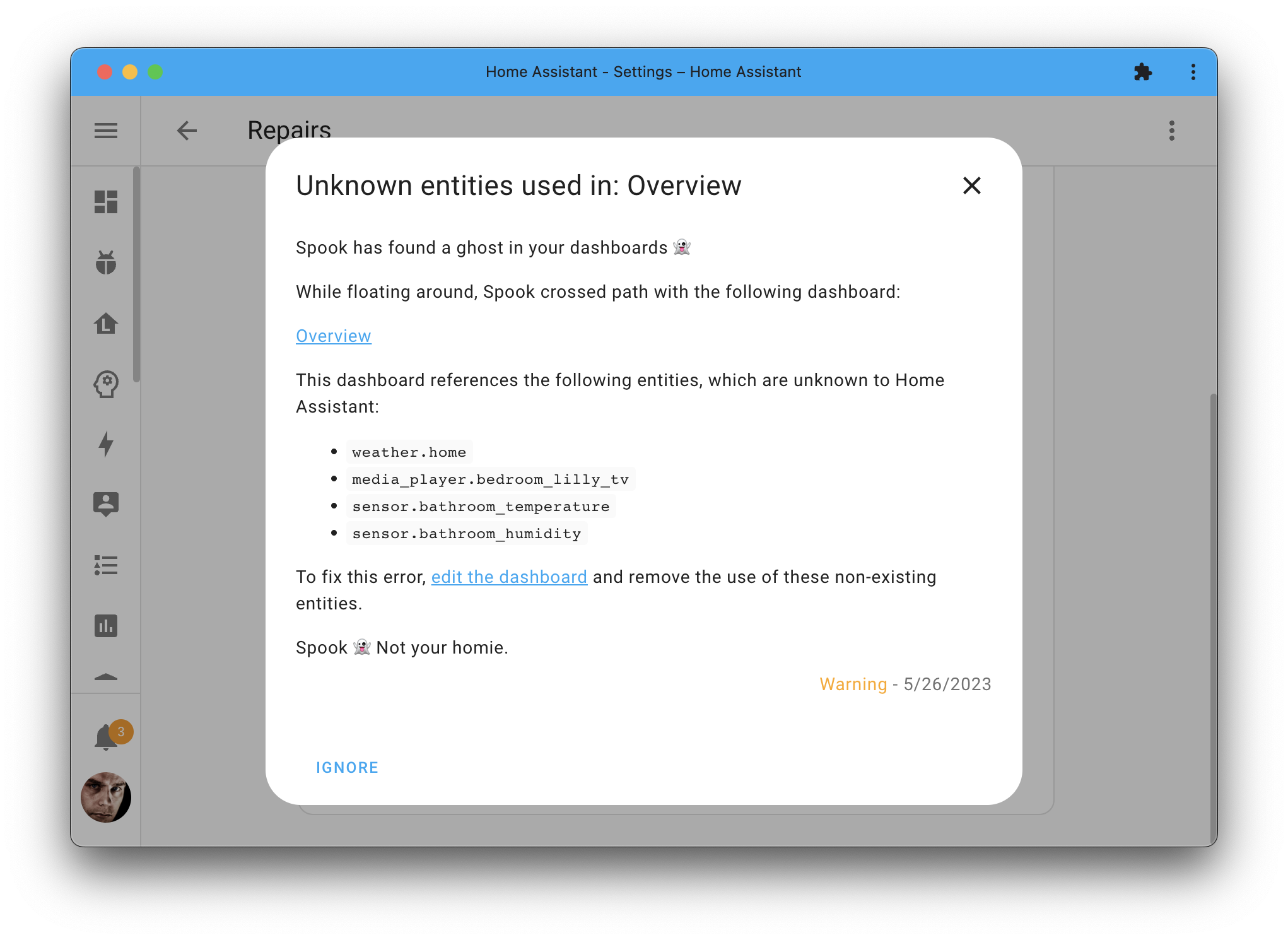
Figure 1:Spook found an issue with an dashboard that is using non-existing entities.
To resolve the raised issue, you can either remove the reference to the non-existing entity ID or fix the referenced entity ID. Spook will automatically remove the repair issue once the issue is fixed.
Known limitations
Spook is not aware of all possible configuration for all possible cards. Especially with third-party cards, configuration can sometimes differ and Spook might not be able to detect the use of an unknown entity ID in such cases.
Most third-party cards use the same keys as Home Assistant’s own (
entity,entities), and those are read on any card. Bubble Card has a few of its own, which Spook knows about: the entity that opens a pop-up (trigger_entity), and the numbered buttons of a horizontal buttons stack (1_entity,1_pir_sensor, and so on).Entities named inside templates, or in a card’s own variables, are not checked. What a template ends up pointing at cannot be known without running it.
Unknown referenced areas
Dashboards are inspected for the use of areas. An area can be referenced in more than one way: by an area card, by the area view strategy, by the area views of a Home dashboard you took control of, by the areas dashboard strategy listing areas to hide or order, by the Mushroom template card, and by an area_id used as the target of an action. The word area on other cards is left alone, since some use it for a caption rather than an area. Spook looks for all of them and raises a repair issue naming the dashboard and the areas that are missing.
What you see depends on where the reference sits, and the frontend decides that rather than Spook, so this page will not promise you a particular symptom. What Spook can tell you is which dashboard names which missing area, which is the part you need either way.
To resolve the raised issue, you can either remove the reference to the non-existing area or fix the referenced area. Spook will automatically remove the repair issue once the issue is fixed.
Unknown referenced attributes
Dashboards are inspected for the attributes they show and check: the attribute of the entity card, the gauge card, the attribute row, the state label element and the entities of a picture glance card, the attribute a map card labels its markers with, the attributes in the state_content of a tile card or an entity badge, and the attribute of state and numeric state conditions and of entity filter state filters. If a dashboard uses an attribute its entity does not have, Spook will raise a repair issue naming the dashboard, the attribute, the entity, and what was most likely meant when Spook is near certain of it.
A card showing an attribute that never shows up stays empty, and a condition checking one never passes. Nothing tells you. That is the ghost this catches.
Spook holds these to the same evidence as the attributes used in automations: an attribute is only reported when Spook cannot find it anywhere. Not on the entity right now, not as something that kind of entity offers in Home Assistant, and not in anything the recorder remembers the entity having. An entity the recorder does not record is only checked for attributes that differ from a real one in upper and lower case alone, like Brightness.
Unknown referenced states
Dashboards are inspected for the states they check for: the state and state_not of visibility conditions on cards, badges and sections, of the conditions of a conditional card, row or picture element, and of the filters of an entity filter card or badge. The states a picture card or image element picks an image or a filter for count too. If a dashboard checks for a state its entity is never in, like On for a light that is on or off, Spook will raise a repair issue naming the dashboard, the state, the entity, and what was most likely meant when Spook is near certain of it.
Only entities whose states are a fixed set are checked, and on the same evidence as the states used in automations. A plain sensor can be anything, so nothing it is asked to be is ever wrong.
The frontend compares a state that looks like an entity ID with the state of that entity as well, so those are never reported. Neither is a condition without an entity of its own, unless it sits on a card or badge whose entity it takes. A filter on an entity filter card is held against every entity on it, and is only reported when none of them can ever pass it.
Spook looks ten minutes after Home Assistant starts, when the recorder has settled. After that it looks again when a dashboard is saved, when an entity is added or removed, when the entity registry changes, when an integration loads, and once a day. The same goes for unknown attributes.
To resolve the raised issue, edit the dashboard and use an attribute the entity has, or a state it can be in. Spook will automatically remove the repair issue once the issue is fixed.
Known limitations
Third-party cards are not checked at all, and neither is anything inside them. They can use the same keys as Home Assistant’s own cards and mean something else entirely.
Templates are not checked, and neither are attributes, states or entities that are only worked out while running.
A state written as a number, or as
trueorfalse, is not checked. How the frontend compares those depends on where the condition is evaluated.
Unknown actions
Dashboards are inspected for the actions their buttons and cards perform. A tap, hold or double tap action set to perform an action that does not exist does nothing when used, and says nothing either: the button just sits there. Spook raises a repair issue naming the dashboard and the actions that are missing.
This usually happens when a script was renamed or removed, or when the integration providing the action was removed. Spook looks again when an integration loads and when actions come and go, so an integration that takes a while to start does not leave a repair issue behind.
Actions of an integration you disabled are not reported: switched off on purpose is not gone. Once you enable the integration again, they are checked as usual.
To resolve the raised issue, edit the dashboard and remove or replace the actions that no longer exist. Spook will automatically remove the repair issue once the issue is fixed.
Known limitations
Spook reads every action set to perform an action, under whatever name a card gives it, so third-party cards using the same shape as Home Assistant’s own are covered too.
An action that is a template, like the JavaScript templates of button-card, is not checked. What it ends up performing cannot be known without running it.
Unknown views
Dashboards are inspected for where they navigate to: a tap, hold or double tap action set to navigate, the navigation path of an area card, and the back button of a subview. When that is a view of a dashboard that does not have it, Spook raises a repair issue naming the dashboard that navigates there and the paths that lead nowhere.
The frontend does not tell you when a view is missing. It opens the first view of that dashboard instead, with the address still showing the view you asked for. This usually happens when a view was renamed, moved to another dashboard, or removed.
A view is found by its path, or by its number counting from 0, the same way the frontend finds it. So /lovelace/kitchen needs a view with the path kitchen, and /lovelace/2 needs a third view, or one with the path 2.
To resolve the raised issue, edit the dashboard and point these to a view that exists. Spook will automatically remove the repair issue once the issue is fixed.
Known limitations
Only a path to a view of a dashboard you made in the UI is checked. A YAML dashboard can pull its views in from other files, and the views of a dashboard run by a strategy, like the areas dashboard, are only made when it opens. Spook cannot see all of those views, so it does not judge them.
Paths to anything that is not a dashboard, like
/config,/historyor an add-on, are not checked.A relative path, or a
#on its own like the pop-ups of Bubble Card, depends on where you are when you tap it, and is not checked. A#after a view is fine: the view it is on is checked.A path that is a template, or uses a card’s own variables, is not checked. Where it ends up cannot be known without running it.
Unknown icons
Dashboards are inspected for the icons they show: on cards, rows, badges, picture elements and views, and the icon of the dashboard in the sidebar. An mdi: icon that is not in the Material Design Icons that come with Home Assistant is drawn as an empty spot. No error, nothing in the logs. Spook raises a repair issue naming the dashboard and the icons that do not exist, and suggests the icon you most likely meant when it is nearly certain.
This usually happens with a typo, an icon that was renamed or removed, or one picked from the Material Design Icons website that is newer than the version Home Assistant comes with. The issue says which version that is.
To resolve the raised issue, edit the dashboard and replace these with icons that exist. The icon in the sidebar is changed in the settings of your dashboards. Spook will automatically remove the repair issue once the issue is fixed.
Known limitations
Only icons starting with
mdi:are checked. The olderhass:prefix, and icons from sets you added, like those from HACS, are left alone.Icons inside a third-party card are left alone: what that card does with them is up to the card. A card of Home Assistant’s own inside one, like in a custom stack, is checked.
An icon that is a template is not checked. What it ends up as cannot be known without running it. That includes the JavaScript templates of button-card.
An icon in the data a button hands to an action is not checked here.
The list of icons is read from the frontend Home Assistant has installed. A frontend run from a development build is not taken into account, and a frontend without that list means nothing is checked.
Removed users
Dashboards are inspected for the users they name: the users of a user condition in the visibility of a card, badge or section (also nested in and, or or not), in the conditions of a conditional card, row or element, the users a view is visible to, and the users exempted from the confirmation of an action. When one of those users no longer exists, Spook raises a repair issue naming the dashboard and the user IDs it cannot find.
Home Assistant gives every user a random ID and never hands the same one out twice, so an ID no user has belongs to a user that was removed. The frontend does not tell you. A card, badge, section or view that was only shown to removed users is now shown to nobody, and an exemption for a removed user does nothing.
To resolve the raised issue, edit the dashboard and pick the users that should see it, or remove the condition. Spook will automatically remove the repair issue once the issue is fixed.
Known limitations
Only something shaped like a user ID is checked. A user written down by name never matched anybody, and is not a user that was removed.
Custom cards are not checked inside, as their keys can mean anything. The visibility you give a custom card is checked, as the frontend handles that for every card.
A dashboard run by a strategy, like the areas dashboard, is not checked.
Unknown themes
Dashboards are inspected for the themes they use: the theme of a view, of a section, and of the cards that take one, also inside stacks, grids, conditional cards and the header and footer of a sections view. When that theme does not exist, Spook raises a repair issue naming the dashboard and the themes that are missing.
The frontend does not tell you when a theme is missing. It only puts on a theme it has, so a card or view asking for one that is gone gets the default look, and nothing says why. This usually happens when a theme was renamed, or the file it came from was removed.
A theme is found by its name, exactly as written, so midnight is not Midnight. default and none are fine: those are built in, not themes of your own. So is Backend-selected, which older versions of the theme picker wrote when no theme was picked. Spook looks again when the themes are reloaded, so adding a theme back clears the issue as well.
To resolve the raised issue, edit the dashboard and pick a theme that exists, or add the theme back. Spook will automatically remove the repair issue once the issue is fixed.
Known limitations
Only the cards that put on a theme are checked. A theme on any other card, like a tile card or a stack, does nothing either way.
Only what the view’s layout draws is checked. A panel view shows its first card only, and the sections, header and footer of a view that is not a sections view are never shown.
Custom cards, and the cards inside them, are not checked. What a custom card does with a
themeis up to the card. The theme of a custom view or section is checked, as the frontend puts that one on itself.A theme that is a template, or uses a card’s own variables, is not checked.
Views, sections and dashboards run by a strategy are not checked. Those are only made when they open.
Missing dashboard resources
Dashboard resources tell Home Assistant which extra JavaScript and CSS files to load, which is how custom cards get there. Spook checks the ones it can: a resource served from /local/ or /hacsfiles/ maps to a file on disk, so Spook can see whether that file is there. If it is not, it will raise a repair issue listing the resources in question.
Resources on an external URL, or served by an integration, are deliberately skipped. Spook cannot verify those without going and asking, so it does not claim to.
A missing local resource usually means a custom card was removed but its resource stayed behind. The cost is paid on every page load, by every browser, for a file that is never going to arrive.
To resolve the raised issue, go to Settings > Dashboards > Resources and remove or correct these resources. Spook will automatically remove the repair issue once the issue is fixed.
Duplicate dashboard resources
The same resource can be listed more than once, and nothing in Home Assistant stops it: every resource you add is handed a fresh ID without anybody checking what it points at.
The usual way in is updating a custom card. The new version wants a new cache-busting URL, so /local/some-card.js?v=1 gains a neighbour at ?v=2 instead of being edited. Both stay. The browser treats two URLs as two files and loads both, the card tries to register itself twice, and the second attempt throws. What you see is a broken card, which sends you looking at the card rather than at the resource list.
Spook raises a repair issue naming each resource that appears more than once, and the URLs involved where they differ.
For a resource served from /local/ or /hacsfiles/ the path is a file on disk, so two URLs differing only in their query string are the same file and are reported as duplicates.
For any other resource, only an exact repeat counts. A query string on somebody else’s server can be the difference between two genuinely different files, and Spook is not going to guess that it is not.
The resource type is part of the comparison either way. Home Assistant loads a module differently from a css, so the same URL listed under two types is two instructions rather than one repeated, and Spook leaves those alone.
Spook raises one repair issue per duplicated resource, so they can be dealt with one at a time. Each one offers three ways out:
Clear the extra copies, keep the most recent. Spook removes every copy but the last one added, which for a card updated by adding a resource instead of editing one is the version you meant to end up with.
Let me fix it myself. Points you at Settings > Dashboards > Resources, and leaves the issue in place until you have.
Leave them, stop telling me. Keeps the resources as they are and stops Spook mentioning that one again.
Resources listed in YAML are static, so there is nothing Spook can delete for you there. Those duplicates are still reported, and choosing to fix one tells you which file to edit rather than offering a button that would quietly do nothing.
Spook will automatically remove the repair issue once the issue is fixed.
Feature requests, ideas, and support
If you have an idea on how to further enhance this integration, for example, by adding a new action entity, or repairs detection; feel free to let us know in our discussion forums.
Are you stuck using these new features? Or maybe you’ve run into a bug? Please check the Support page on where to go for help.